Invitations
Retirement party invitation wording for hosts and coworkers
A retirement party invitation should name the host and guest of honor, then give the date, time, place and reply instructions. Check speeches, photographs and surprises with the person retiring before announcing them. Distinguish an event hosted by coworkers from an invitation the retiree sends personally to friends and family.
Updated 2026-11-14

Retirement can mean a shared meal, a brief workplace gathering or a quiet farewell. The invitation should reflect what the person actually wants rather than defaulting to jokes about age or unchecked career claims. This guide provides fictional examples to adapt, explains whose voice to use and offers a local wording review. Agree on a realistic format before designing the card. You can express appreciation without promising a large party, an emotional speech or a surprise that the guest of honor may not welcome.
| Decision | Confirm | Avoid |
|---|---|---|
| Tribute | Asked preference | Imposed surprise |
| Invitation | Agreed sender | Ambiguous voice |
| Organization | Owner and deadline | Task without handover |
Who is sending the invitation?
When the team hosts, try “Please join us to celebrate [name] as they retire.” When the retiree hosts, try “I would love to celebrate this next chapter with you.” Mixing those voices can imply that an employer is paying for a private party or that the retiree arranged an event planned by someone else.
Name a contact who has agreed to handle replies. Confirm permission before using an organization’s name or logo. An informal gathering arranged by colleagues should not be described as an official employer event without that agreement.
Two templates with different hosts
Fictional team example: “Join us to celebrate [name]’s retirement on [date] at [time], at [venue and address]. We will share [confirmed format]. Please reply to [contact] by [day]. We hope you can join us.” Check any service dates, job titles or awards before including them.
Personal example: “To celebrate this next chapter, I would love to share a meal with you on [date] at [time], at [address]. Please let me know by [day] if you can come.” Replace every placeholder and read the full message aloud.
Read more: How to Organize an Office Social That Welcomes Participation.
Review the scope before replying
Agree on people and schedule scope before sending. Do not promise entry arrangements or services without checking.
Check that the list and message agree. A read notice does not confirm attendance.
Keep the question pending until an explicit answer. Do not add seats automatically.
Compare two scope statements
Use fictional examples. Matching does not prove sending, attendance or approval.
- Invitation
- List
Final wording review
Reviews: 0 of 5.
Reviews: {n} of 5.Agree on the tribute before announcing it
Ask privately whether the retiree wants speeches, photographs or messages from coworkers. Do not promise a slideshow using other people’s material or publish private information to explain the departure. If they prefer a simple gathering, reflect that preference in the invitation. The team’s enthusiasm does not replace the guest of honor’s agreement.
A surprise can be a small agreed detail rather than the entire event. Do not hide the nature of a gathering from someone who needs to plan their time or decide whether to attend. When unsure, choose an announced plan.
An invitation layout perspective
ItsTrixTV shows a separate digital invitation design workflow. The tutorial illustrates card layout; it does not decide who is invited or demonstrate an automatic Convite RSVP feature. Review who is included and what remains undecided before adapting the design.
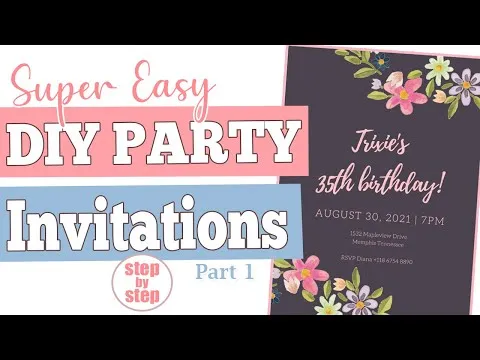
The YouTube player loads when you open the video. Watch on YouTube.

Clarify food, contributions and guests
Say whether this is a meal, a short coffee gathering or an after-work celebration. If a contribution is required, give the confirmed terms before asking people to reply. Do not publish an estimate as a final amount. Keep a group gift separate from attending the event.
State who the message includes and whether a guest may bring someone. A forwarded message should not automatically expand the guest list. Ask only for necessary food or access information through a private channel.

Organize replies and responsibilities
One person can collect replies while another handles the venue, provided each role has a clear boundary. Keep pending responses separate rather than counting a read message as acceptance. If the time changes, announce it explicitly and ask previous respondents again when the change affects their availability.
Use the task-sharing guide to assign an action and an owner rather than circulating the full guest list. Keep a direct reply option for people who do not open a digital card.
Read more: How to Divide Event Tasks Without Overloading the Host.

Review the final message
Check the sender, name, date, time, address and contact. The local comparison flags text differences but cannot verify career details or consent for a tribute. Try it with fictional examples. Then review the card on a phone and replace any unresolved details before sending it.
Convite provides QR invitations and guest-list features within its actual terms. Learn about the app from its home page. Agreement on the tribute, team coordination and replies remain the responsibility of the people hosting.
Also read: How to plan a surprise party without making the guest of honor uncomfortable.
Before finalizing your plan
Does it need to be a surprise?
No. Ask what format the retiree prefers.
Can I mention years of service?
Only with checked details that are appropriate to share.
Who receives replies?
A contact who has agreed to handle them.
Is a gift required?
Do not present it as a condition of attendance.
Can guests bring someone?
State the agreed guest policy explicitly.
Does the tool send the message?
No. It helps review it locally.